

How We Made Toothpaste Look Cinematic: A Colgate MaxFresh CGI Breakdown
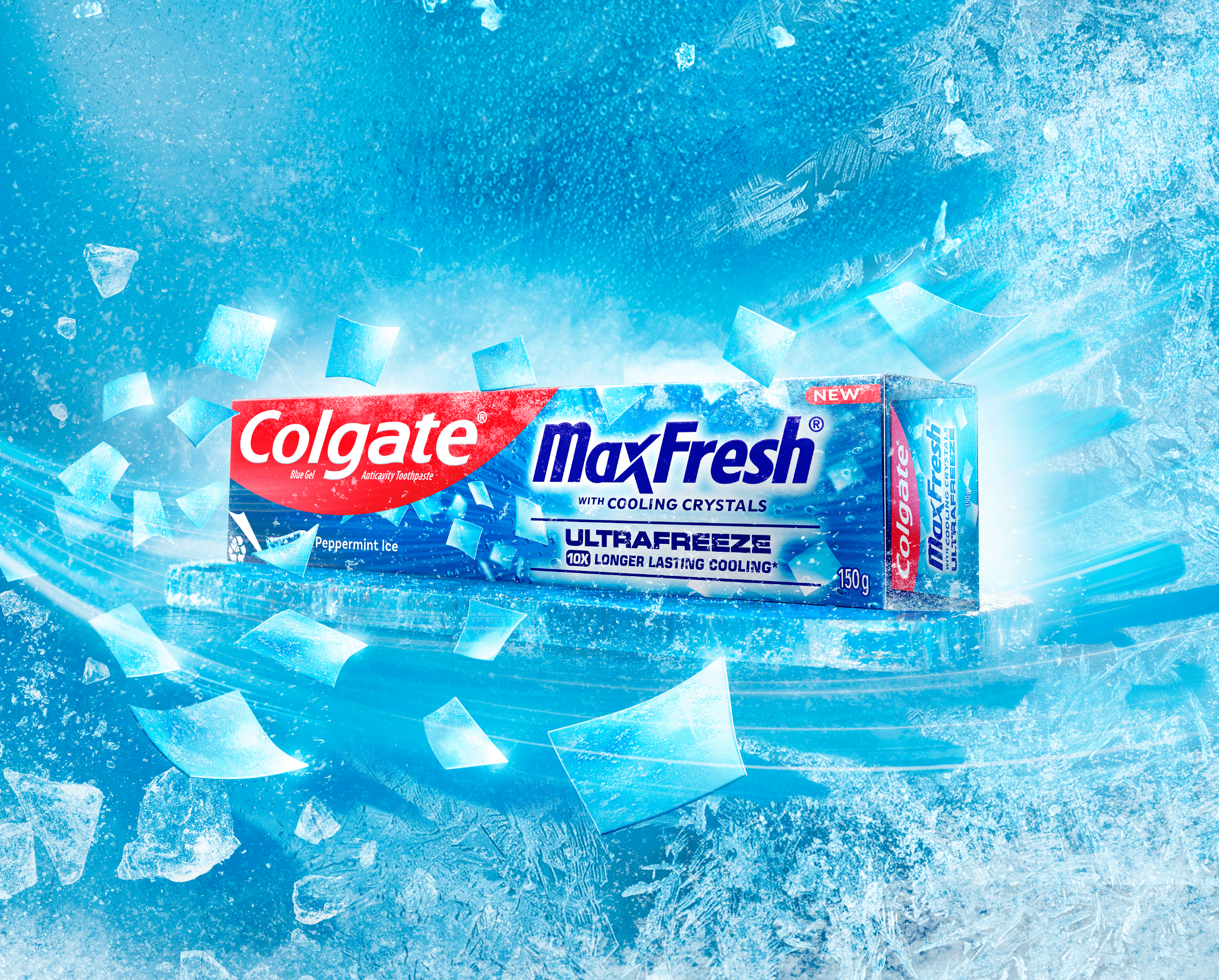
A box of toothpaste is one of the most ordinary things in your home. It lives in a bathroom cabinet, gets picked up in a hurry, and rarely earns a second glance. So when a brand like Colgate MaxFresh needs a hero frame that stops a thumb mid-scroll, the challenge is deceptively hard: how do you make something this everyday feel aspirational, cool, and genuinely cinematic?
For us, the answer wasn't just one technique — it was three working together: 3D modelling, high-end retouching, and AI, brought together with a real photographed model to create the final key visual. This project has become one of our favourite examples of what happens when human expertise and AI tools are used in tandem rather than one replacing the other. It's also a solid case study in something brands ask us about constantly: building one strong visual and adapting it correctly across very different platforms.
Here's a behind-the-render look at how a plain product became a hero — and why building it in 3D gave us control a lens simply can't.
Starting With Nothing, Which Is the Point
A photograph starts with a real object under real light. CGI starts with a blank space and a decision. That blank space is the secret weapon.
When we build a Colgate MaxFresh carton in 3D, we begin by modelling the geometry with precision — the exact proportions of the box, the crisp edges and folds, the slight bevel where each panel meets the next. We're not approximating a shape; we're reconstructing the pack so faithfully that a viewer's eye reads it as unmistakably real, even as everything around it becomes heightened.
Why go to this trouble instead of just shooting it? Because a physical carton dents at the corners, catches stray reflections, and never quite sits the way you want against a busy set. A CGI model is perfect on demand. We can rotate it a fraction of a degree, adjust how it sits on its surface, or reshape a highlight without a reshoot. Every choice stays open until the very last frame.
And with MaxFresh, the modelling is only the foundation. The pack needed to sit inside a world that sold the idea of “ultra freeze” on sight — ice, frost, and cold in motion. That's where the craft really begins.
Materials, Ice, and the World Around the Pack
If modelling is sculpture, shaders are where the magic happens. A shader tells the computer how a surface behaves with light — whether it drinks light in, bounces it back, or lets it pass through. This is the difference between “a picture of a toothpaste box” and a scene you can almost feel the cold coming off of.
Think about what MaxFresh Ultrafreeze is meant to feel like: icy, minty, energising. So the world around the pack couldn't be a plain studio backdrop — it needed real frost. We built a frozen surface for the carton to sit on, with a crust of ice and frost texture across it, and populated the scene with individual ice shards, shattered and catching light as if the pack had just burst through a block of ice. Each shard needed its own translucency and refraction so it reads as genuine ice rather than a flat cutout — light traveling into the shard, bending, and scattering back out.
The carton's printed graphics — the Colgate red, the MaxFresh blue, the icy typography — sit on a semi-gloss box material that had to hold its own against all that surrounding ice without looking dull or getting lost in it. Getting that balance right — a crisp, legible pack against a swirling icy environment — is a huge part of why the final frame feels premium rather than busy. A camera would fight you on shattered ice, frost texture, and product legibility all at once. In CGI, we build and tune each element independently until they sing together.
Even the “ultra freeze” idea — that abstract sense of intense cold — becomes a material and effects decision: motion-streaked frost in the background, sharp-edged ice shards mid-flight, a glowing icy light bleeding through the scene. All of it quietly tells your brain “cold” before you've read a single word of copy.
Lighting for That Cool, Fresh Look
Here's where CGI stops being technical and starts being cinematic. Lighting is storytelling, and in a 3D scene we control every photon.
Freshness has a temperature, and it leans cool. So we lit the scene with that in mind — a bright, glowing light source behind the pack that reads almost like sunlight through ice, with cooler cyan and blue tones carrying through the frost and shards in the foreground. We placed rim light along the top edge of the carton to lift it cleanly off the icy background so it reads as a hero, not just another object caught in the frost. Streaks of motion and light were layered in to suggest the pack bursting into frame with real energy.
The beauty of virtual lighting is that nothing is fixed. A real photographer wrestles with flags, bounce cards, and reflections they can't fully tame — and building a full field of flying, backlit ice shards practically would be its own production nightmare. In CGI, we can add a light that exists only to sharpen one edge of the carton, dim a reflection that's distracting, or intensify the glow behind a single ice shard, and it costs us nothing but a decision. Every light serves the story of “ultra freeze,” and none of them are accidents.
That level of intention is what separates a product shot from a product film frame. Nothing in a cinematic image is there by chance — and CGI lets us make sure of it.
The Final Retouch and Composite
Once the render is out, the work isn't over — it's being refined. This is also where the scene stops being a pure CGI exercise. The final key visual brings a real photographed model into the frame, blowing an icy breath toward the pack, and that shot has to sit inside the CGI world so convincingly that nobody can tell where the photograph ends and the render begins. This is where high-end retouching and compositing carry the most weight, and where the human eye does its most important work.
Compositing is the art of layering: the model plate, the pack, the ice shards, the frozen surface beneath it, the frosted background, and the glow of light through it all come together into one seamless frame. The model's photographed lighting has to be colour-matched and relit to agree with the CGI light source, her breath has to blend into the same icy streaks and shards flying through the scene around the pack, and the frost dusting on her hair and shoulders has to feel like it belongs to the same cold world as the carton rather than being pasted on top of it. We balance colour so the icy blues stay crisp and vivid without turning clinical or cold in a lifeless way. We refine contrast so the pack still reads clearly as the hero even with a model, headline type, and dozens of ice shards all competing for attention in the same frame. We clean up any micro-distraction that pulls focus from the story.
AI tools sit alongside this stage too — helping us explore variations of the frost, ice, and background elements faster, so more creative energy goes into taste and judgement rather than repetitive labour. That's really the summary of this whole project: AI accelerates the exploration, but the craft still lives in human expertise deciding what “fresh” should actually feel like, frame by frame. Neither one on its own gets you to a hero image this polished — it's the combination that does.
The result is a single frame — model, headline, and pack all in one icy world — where an ordinary box of toothpaste looks like it belongs on a cinema screen — aspirational, ice-cool, and unmistakably Colgate MaxFresh.
One Visual, Many Platforms
Making the hero frame was only half the job. The real test of a visual like this is whether it still works once it leaves the render and lands where people actually shop.
This project needed to live across both e-commerce and quick commerce — Amazon alongside Blinkit, Zepto, and Instamart. Each of these platforms has its own grid, its own crop ratios, its own thumbnail size, and its own attention span. A wide, ice-shard-filled hero frame built for an e-commerce banner doesn't just shrink down cleanly into a Blinkit product tile; it has to be re-composed — reframed, sometimes re-lit, with the pack and its “ultra freeze” cues rebalanced so it still reads as premium and unmistakably icy at a glance, whether someone's browsing on a laptop or scrolling a 10-minute delivery app on their phone.
Because the whole scene was built in 3D rather than shot once and locked, this was straightforward for us. We could re-render, recompose, and adapt the same core visual — carton, ice, frost, and all — for each platform's layout without losing the lighting, material work, or brand feel that made the original frame work in the first place.
Why This Project Matters to Us
Beyond the render itself, this project is a good marker of a few things we're genuinely proud of:
- FMCG expertise. Colgate MaxFresh sits squarely in FMCG, a category we've built real depth in — understanding how everyday products need to look premium without losing shelf-level clarity.
- AI plus human craft, not AI instead of craft. This is one of our clearest examples of AI tools speeding up exploration while the final judgement — what “fresh,” “premium,” or “cinematic” actually looks like — stays firmly in human hands.
- Platform-aware design. One strong visual isn't enough anymore. This project shows our process for taking a single hero asset and correctly adapting it across e-commerce and quick commerce platforms, each with different layout demands.
- D2C-ready capability. The same modelling, shading, lighting, and retouching approach that worked here scales down comfortably for D2C brands, who need this level of polish without a full production shoot.
Why CGI, Really
Strip away the technique and the honest answer is control. Control over form, over surface, over light, over the final grade — and, just as importantly, control over how a real photographed moment and a fully built 3D world come together as one believable frame. A camera alone captures what exists in one moment; CGI lets us build the world around that moment, and keep refining it until it's right, wherever it ends up being seen.
That's how you make toothpaste look cinematic. Not with a trick, but with intention at every stage — from the first vertex and the photoshoot, through the final composite, and from the first platform to the last.
If you've got a product that deserves its own hero frame — cinematic, controlled, and built to stop the scroll on every platform it lands on — we'd love to talk. Bring us your next campaign, and let's make the ordinary look extraordinary.